
I didn't have time to brush up on my "how to shoot lightning" research, so I was guessing at camera settings. I used manual mode, set the focus to infinity, and used f/8 aperture with a shutter speed of 2.5 seconds. I had my long lens on, the 70-300mm with image stabilization. I think in future attempts I might want to go with a wide angle lens (though I don't have one yet! LOL - the kit lens 18-55mm that came with the Rebel is the widest angle I've got).
I vaguely recalled reading of a guy who would just set the camera on bulb mode and leave the shutter open for a couple minutes, then close and repeat. I tried longer shutter speeds like that, but there was a lot of flash lightning mixed in with the bolts, so it wasn't really working.
I was doing all of this from the safety of my bedroom, shooting from my window. This particular shot that I got was actually hand-held. I was pretty much pressing the camera between my body and the window, with the lens resting on the window sill. Eventually, I ran down to get my tripod, but by then most of the good lightning had passed.
I used Adobe Lightroom to fix the exposure a bit (it was overexposed), blacken the blacks, and add the purple tint. My free trial finally ran out on Lightroom, but I've enjoyed using it so much that I purchased it, along with the Adobe Photoshop Lightroom Book for Digital Photographers by Scott Kelby
 .
.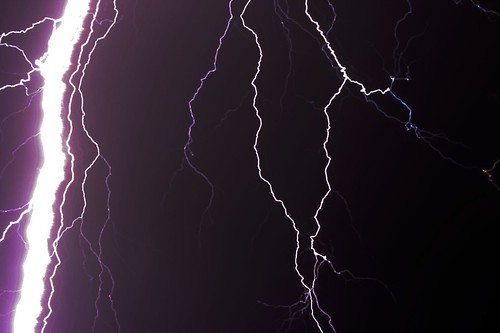
| Camera: | Canon EOS Digital Rebel XTi |
| Exposure: | 2.5 sec (5/2) |
| Aperture: | f/8 |
| Focal Length: | 70 mm |
| ISO Speed: | 100 |
| Exposure Bias: | 0/3 EV |
| Flash: | Flash did not fire |







 Digg/phlyersphan
 Flickr/phlyersphan
 Myspace/phlyersphan
 YouTube/phlyersphan
 Last.fm/phlyersphan
 Del.icio.us/phlyersphan
 GMail/phlyersphan
 Technorati/phlyersphan
 Geek Blog/geekgoesmeow
 Photography Blog/photoN00b


No comments:
Post a Comment